Built for Salesforce Marketing Cloud
Make LINE Part of Your SFMC Workflow.
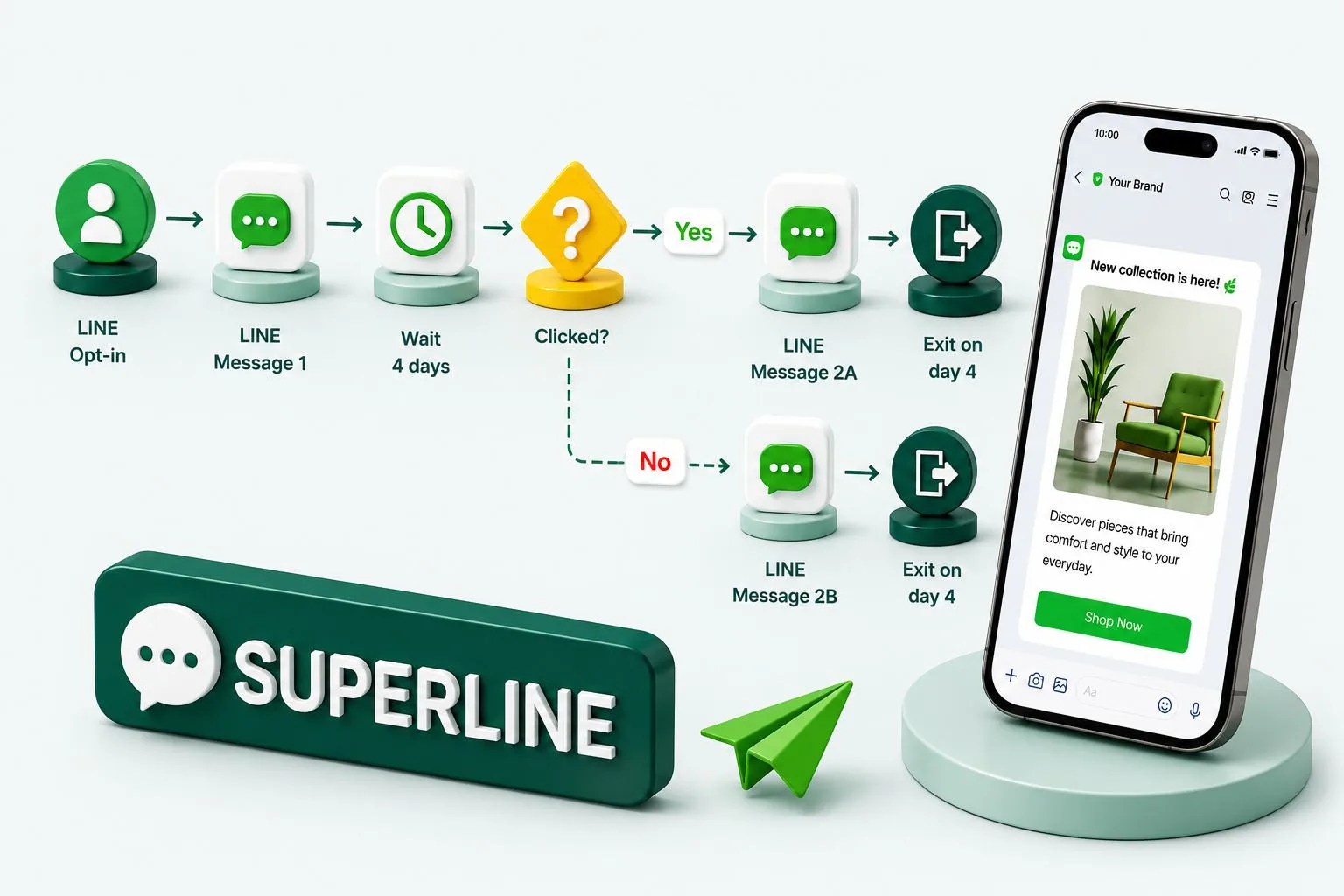
Build LINE campaigns without code. See email and LINE engagement in one clear view. SuperLine brings it all into the SFMC workflow your team already knows.
- ✓Inside your existing SFMC workflow
- ✓No-code LINE execution
- ✓Email + LINE tracking
One familiar operating environment for email and LINE campaigns.
The operational gap
LINE Campaigns Should Not Sit Outside Your Marketing Workflow.
Separate briefs, tools, and reporting make each send harder to execute and every customer journey harder to understand. SuperLine brings LINE execution closer to the SFMC workflow your team already uses.
Fewer handoffs
Build LINE campaign activity directly in the SFMC environment instead of coordinating routine execution across disconnected tools.
One operating context
Keep the team close to the customer data and journey context already used for email marketing.
Cross-channel visibility
Review supported email and LINE engagement signals together to inform the next campaign decision.
Why SuperLine
The Enterprise Platform for LINE at Scale.
SuperLine helps enterprise marketing teams run LINE Official Accounts at scale, with the speed, governance, and control to manage campaigns in-house and reduce reliance on agencies and manual workflows.
Built for enterprise
Role-based access and audit logging support enterprise security and governance. Teams access SuperLine through the package within SFMC.
No-code LINE execution inside SFMC
Create, schedule, and launch LINE campaigns directly from Salesforce Marketing Cloud journeys. Marketers can configure each send without coding or developer support.
Fast time to value
A structured onboarding plan helps marketing and IT teams move from configuration to their first campaign under existing governance processes without a lengthy implementation project.
Unified omnichannel tracking
View supported email and LINE engagement metrics in one SFMC reporting view to compare campaign performance across both channels.
No-code LINE execution
Create and Launch LINE Campaigns from within SFMC.
Give campaign teams a guided way to prepare LINE messages without asking developers to build each send.
- ✓Work where your team already worksAccess SuperLine as a package inside Salesforce Marketing Cloud.
- ✓Configure without codePrepare content, select the intended audience, and set campaign timing through a visual workflow.
- ✓Execute with less coordinationReduce routine back-and-forth while your existing review process stays in place.
Omnichannel tracking
See Email and LINE Engagement in One Campaign View.
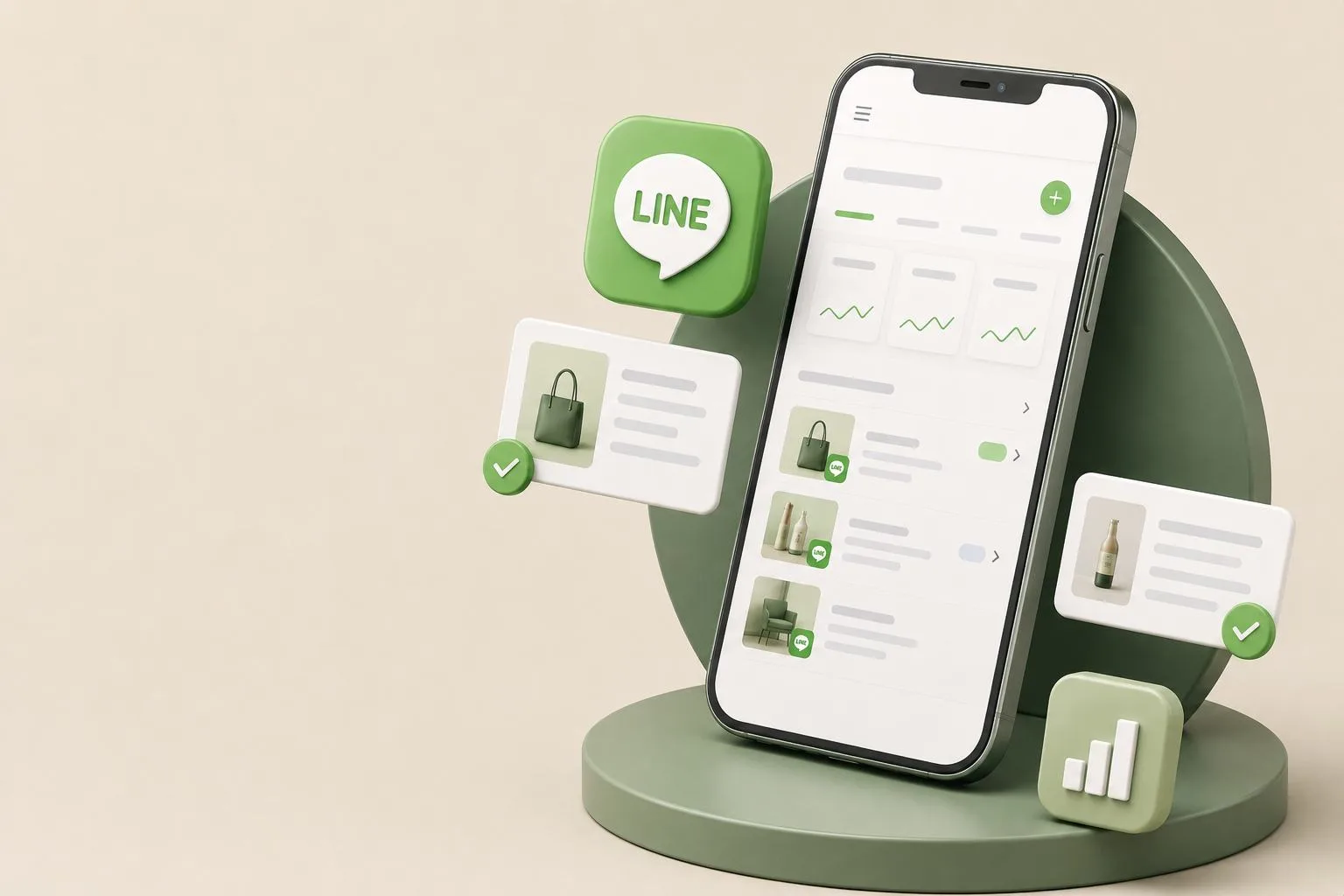
Connect supported channel signals in SFMC so marketers can compare performance and optimize the journey without stitching together separate reports.
Review the email engagement metrics available to your SFMC implementation.
LINE
Track supported LINE delivery and engagement events, such as clicks, at campaign level.
Available metrics depend on your SFMC and LINE implementation.
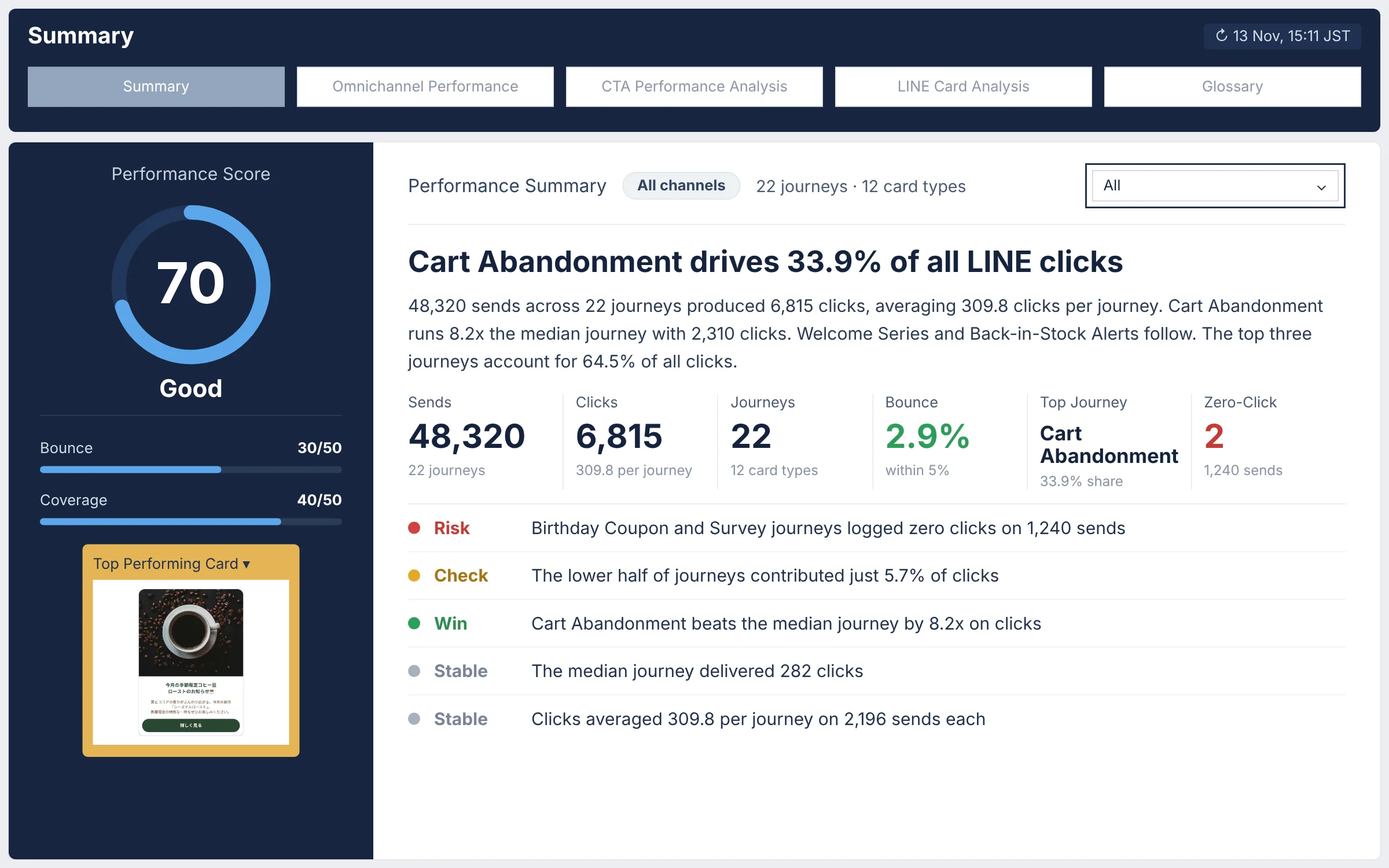
See SuperLine in action
See the Workflow. Understand the Impact.
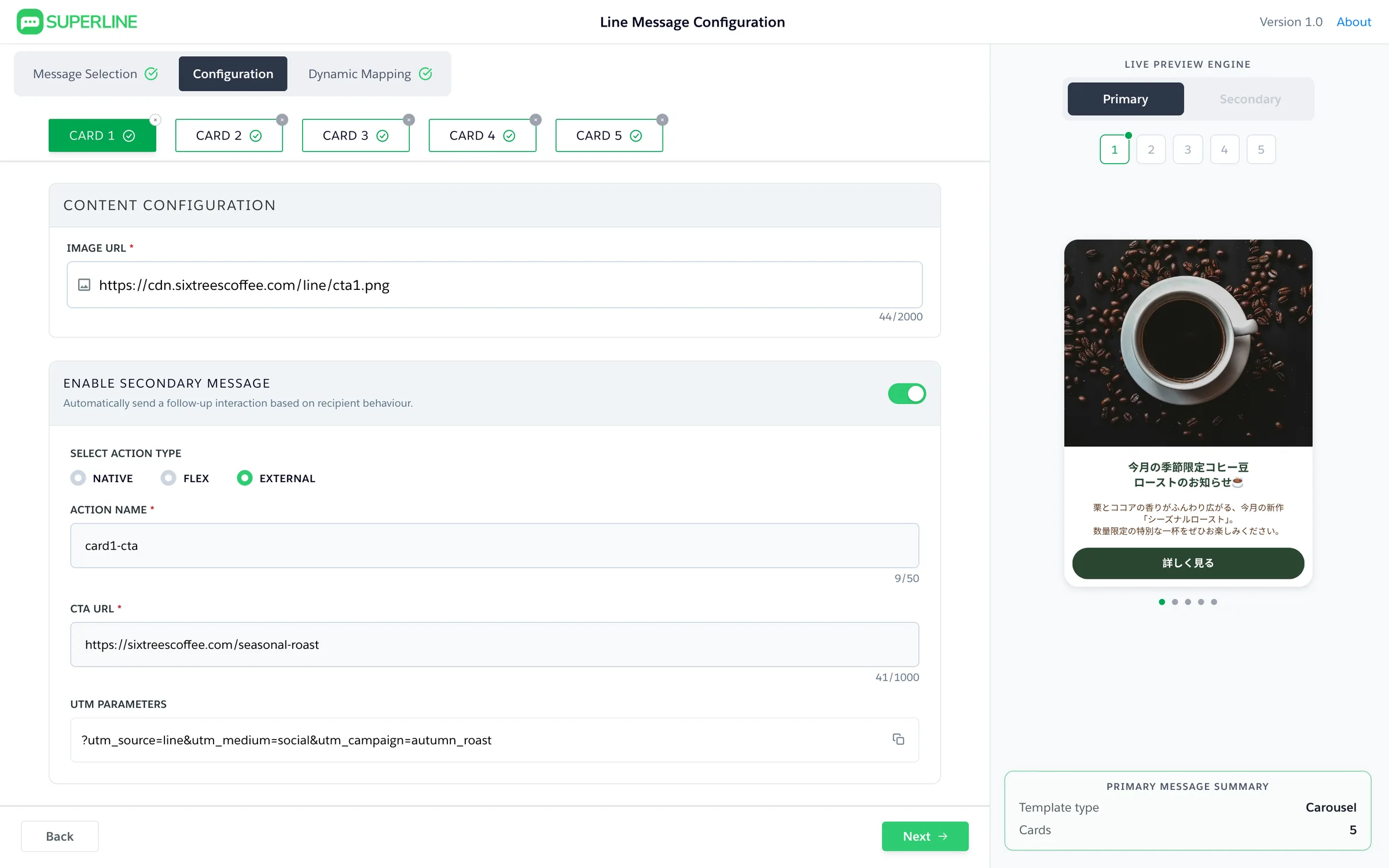
SuperLine brings LINE execution and cross-channel visibility into the SFMC environment your team already uses. See how marketers can move from campaign creation to performance insight in one connected workflow.
 Click to enlarge
 Click to enlarge
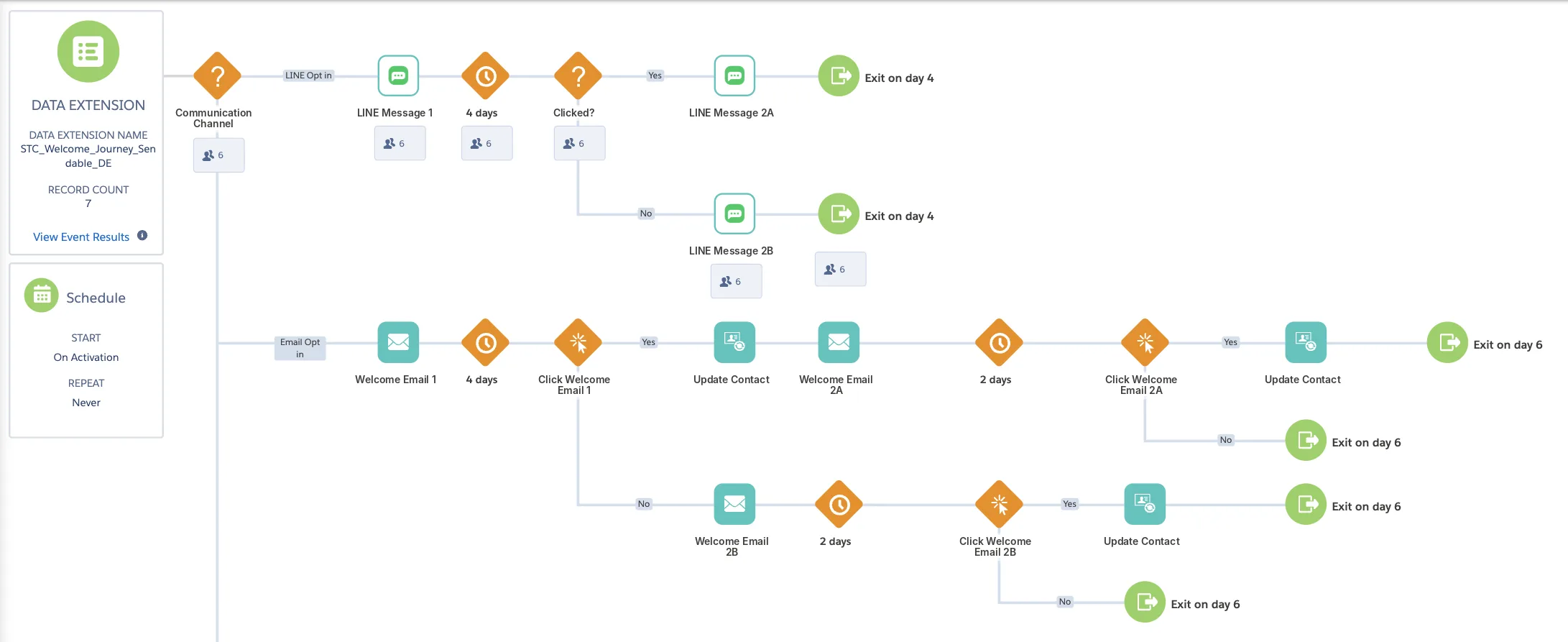
Click to enlarge
How it works
From Campaign Idea to Measurable LINE Engagement.
Build, launch, and measure LINE campaigns in three steps.
Build LINE alongside email
Build the LINE campaign using the SuperLine package and your SFMC audience context.
Launch the campaign
Schedule or send to the selected LINE audience after your organization’s existing checks are complete.
Review channel signals
Use supported email and LINE performance data to inform the next journey decision.
Designed for enterprise teams
Add LINE to the Salesforce Workflow Your Team Already Knows.
SuperLine works inside SFMC, keeping LINE campaign execution connected to the tools and processes your team already uses.
No separate destination. No extra sign-in. No second asset library. No new approval system.
Faster campaign setup
Prepare LINE activity without waiting for custom development for every campaign.
Better journey context
Plan email and LINE touchpoints around the same customer strategy.
Clearer channel view
Bring supported cross-channel signals closer together for campaign analysis.
Business case
Build the Case with Your Own Operating Baseline.
Rather than rely on generic savings claims, compare today’s LINE execution effort with a measured SuperLine pilot.
Baseline inputs to capture
Use values your finance and operations teams can verify.
Reduce routine execution effort
Estimate the internal and external hours that can be avoided when marketers prepare LINE campaigns through a no-code workflow in SFMC.
Measure: # of Hours per CampaignShorten campaign lead time
Compare the elapsed time from an approved brief to a scheduled LINE campaign before and during the pilot.
Measure: # of Business Days to LaunchSimplify cross-channel reporting
Track how much analyst time is required to assemble an email + LINE campaign view for stakeholders.
Measure: # of Reporting Hours per CycleConnect value to a verified pilot
Document the implementation scope, campaign volume, assumptions, and observed change before presenting ROI.
Outcome: Defensible Investment CaseFAQ
Questions Your Team May Ask.
Is SuperLine a separate platform?
No. SuperLine is accessed as a package inside Salesforce Marketing Cloud, so campaign teams can work within their existing SFMC environment.
Do marketers need to code LINE campaigns?
SuperLine is designed for no-code campaign execution. Exact configuration and supported content types can be confirmed during a product demonstration.
What can we measure across email and LINE?
SuperLine brings supported email and LINE campaign signals into a shared SFMC reporting context. Available measures depend on your channel setup; LINE opens are not tracked at the user level.
Does SuperLine require a separate approval, SSO, or an asset library?
No. Access is through the SFMC package, and your existing assets and review process stay as they are.
Can SuperLine support separate QA and production environments?
Yes. SuperLine supports separate QA and production environments, so teams can validate configuration and campaign setup before production use. The exact environment structure is confirmed during implementation.
Start Integrating LINE Messaging inside the Workflow You Already Know.
See how SuperLine can support no-code LINE campaigns and omnichannel tracking in your SFMC environment.
Salesforce Marketing Cloud向け
使い慣れたSFMCのワークフローに、LINEを。
LINE施策をノーコードで作成し、メールとLINEの反応をひと目で把握。SuperLineなら、いつものSFMCのワークフローで、作成から効果測定まで行えます。
- ✓既存のSFMCワークフローで利用
- ✓LINE施策をノーコードで実行
- ✓メールとLINEの効果測定
メールとLINEを、ひとつの運用環境で。
運用上の課題
LINE施策を、日々のマーケティング業務に。
企画の共有、ツール、レポートが分かれていると、配信作業も顧客ジャーニーの把握も複雑になります。SuperLineは、チームが日常的に使うSFMCのワークフローにLINE施策を組み込みます。
引き継ぎを減らす
SFMC内でLINE施策を組み立て、複数のツールにまたがる日々の調整を減らします。
同じ環境で施策を運用
メール施策で使っている顧客データやジャーニーの情報をLINE施策にも活用できます。
チャネルを横断して成果を把握
メールとLINEの取得可能な指標をまとめて確認し、次の施策に活かします。
SuperLineが選ばれる理由
LINE公式アカウントの大規模運用を支える企業向けプラットフォーム。
SuperLineは、企業のマーケティングチームがLINE公式アカウントをスピーディーに運用しながら、社内のルールに沿って施策を管理できるように設計されています。外部委託や手作業への依存を減らし、LINE施策を自社で運用できます。
企業のセキュリティとガバナンスに対応
役割に応じたアクセス権限と監査ログで、企業のセキュリティとガバナンスを支えます。チームはSFMC内のSuperLineパッケージから利用できます。
SFMC内でLINE施策をノーコードで実行
Salesforce Marketing Cloudのジャーニー上で、LINE施策の作成から配信予約、配信まで行えます。コードの記述や開発者のサポートは不要です。
導入から初回配信までを短縮
導入手順に沿って、マーケティング部門とIT部門が設定を進め、既存の運用ルールに従って初回のLINE施策をスムーズに実施できます。
メールとLINEの効果測定を一元化
メールとLINEで取得可能な反応指標を、SFMCの同じレポート画面で確認し、チャネルを横断して施策の成果を比較できます。
ノーコードでLINE施策を実行
SFMC内でLINE施策を作成・配信。
施策担当者は、画面の案内に沿ってLINEメッセージを準備できます。配信のたびに開発者へ依頼する必要はありません。
- ✓いつもの環境で作業Salesforce Marketing Cloud内のSuperLineパッケージを利用します。
- ✓ノーコードで配信を設定画面上でコンテンツ、配信対象、配信日時を設定できます。
- ✓日々の調整を削減既存の社内確認プロセスを維持しながら、日常的なやり取りを減らします。
オムニチャネル計測
メールとLINEの反応を、一つの画面で。
メールとLINEの取得可能な指標をSFMCにまとめ、チャネルごとの成果を比較してジャーニーを改善できます。
メール
お使いのSFMC環境で取得できるメールの反応指標を確認できます。
LINE
配信やクリックなど、取得可能なLINEの指標を施策単位で確認できます。
利用できる指標は、SFMCとLINEの導入構成によって異なります。
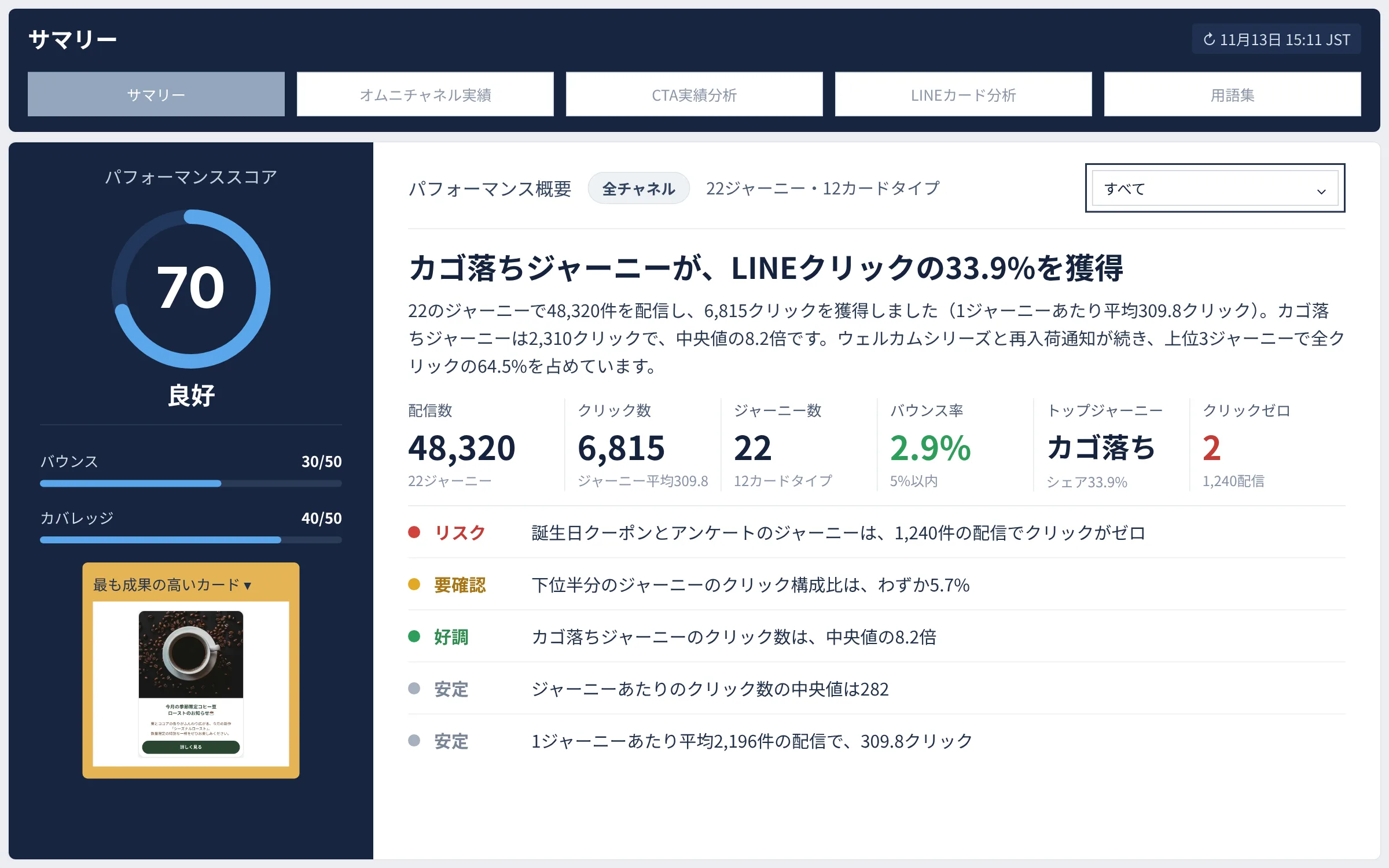
SuperLineの操作画面
施策の作成から、配信結果の確認まで。
SuperLineなら、普段お使いのSFMC環境でLINE施策を実行し、メールとLINEの成果をまとめて確認できます。施策の作成から効果測定までの流れをご覧ください。
クリックで拡大
 クリックで拡大
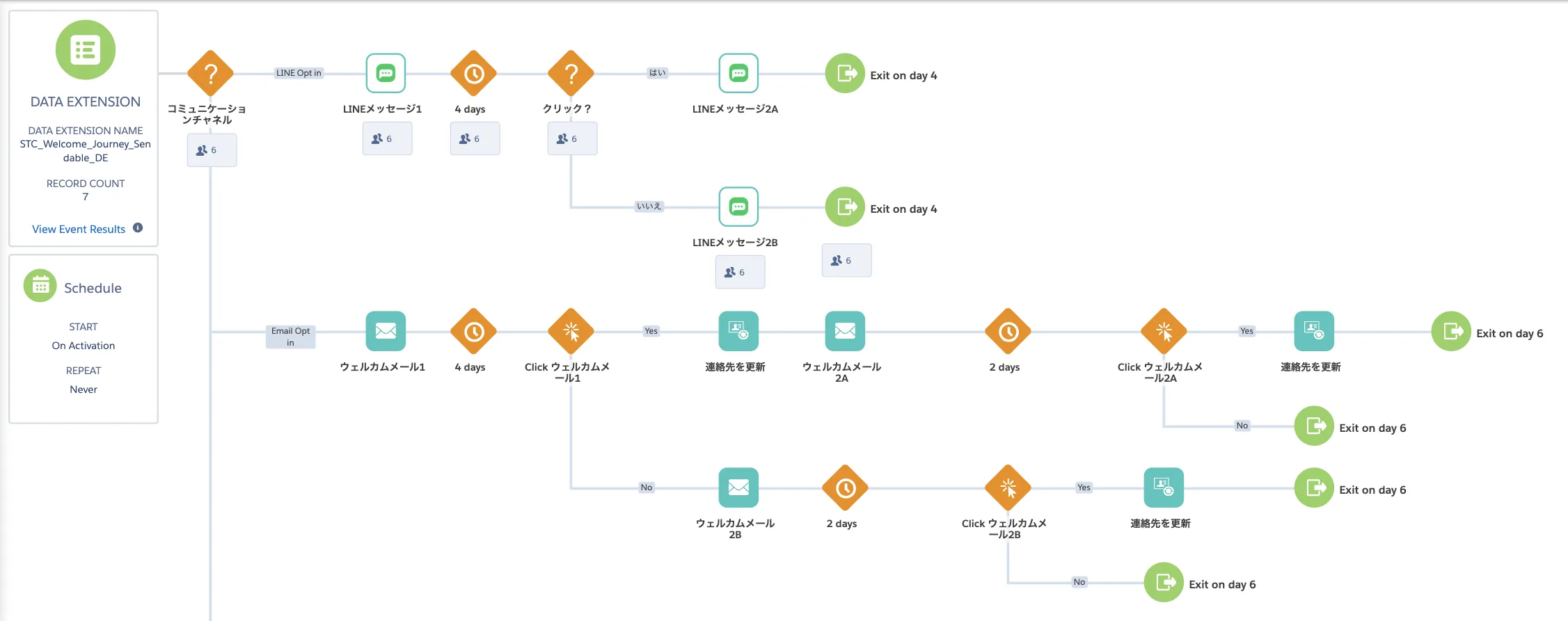
クリックで拡大
利用の流れ
企画からLINE施策の効果測定まで。
LINE施策の作成、配信、効果測定を3つのステップで進めます。
メールとあわせてLINE施策を作成
SuperLineパッケージとSFMCのオーディエンス情報を使って、LINE施策を作成します。
LINE施策を配信
社内で必要な確認が完了したら、選択したLINEの配信対象に予約配信または即時配信します。
チャネルごとの反応を確認
メールとLINEで取得できる実績データを、次のジャーニーの改善に活かします。
企業のマーケティングチーム向け
使い慣れたSalesforceのワークフローに、LINEを追加。
SuperLineはSFMC内で動作し、チームが普段使うツールや業務プロセスの中でLINE施策を実行できます。
ログイン方法、素材ライブラリ、社内の確認プロセスは、現在の運用をそのまま利用できます。
施策準備を迅速に
施策ごとの個別開発を待たず、LINE施策を準備できます。
顧客ジャーニーを一貫して設計
メールとLINEの接点を、同じ顧客戦略の中で計画します。
チャネルごとの成果を把握
取得可能な指標をまとめ、チャネル横断の施策分析に活かします。
導入効果
自社の運用実績を基に、導入効果を検証。
現在のLINE運用にかかる工数を、SuperLineの試験導入で得た実績と比較します。
比較する指標
財務・運用チームが確認できる自社の数値を使います。
日常の施策実行にかかる工数を削減
SFMC内でLINE施策をノーコードで準備した場合に削減できる社内外の工数を見積もります。
測定指標:施策あたりの作業時間配信までのリードタイムを短縮
企画承認からLINE施策の配信予約までにかかる期間を、試験導入前と導入中で比較します。
測定指標:配信までの営業日数チャネル横断レポートを効率化
関係者向けにメールとLINEの成果をまとめるための分析工数を確認します。
測定指標:レポート作成1回あたりの時間試験導入の結果を投資判断に活用
ROIを示す前に、導入範囲、施策数、前提条件、確認できた変化を記録します。
成果:実績に基づく投資判断よくある質問
導入検討時の確認ポイント。
SuperLineは別のプラットフォームですか?
SuperLineはSalesforce Marketing Cloud内のパッケージです。施策担当者は既存のSFMC環境で作業できます。
LINE施策にコーディングは必要ですか?
SuperLineでは、LINE施策をノーコードで実行できます。具体的な設定方法と対応コンテンツは、製品デモでご確認ください。
メールとLINEで何を計測できますか?
メールとLINEの取得可能な指標を、SFMCの同じレポート画面で確認できます。利用できる指標はチャネル設定によって異なります。LINEの開封はユーザー単位の計測対象外です。
専用の承認フローやログイン、素材ライブラリは必要ですか?
いずれも不要です。SuperLineは既存のSFMC環境から利用でき、素材や社内の確認プロセスも現在の運用をそのまま使えます。
検証環境と本番環境を分けて運用できますか?
はい。検証環境と本番環境を分けることで、本番運用前に設定や施策の準備内容を確認できます。具体的な環境構成は導入時に確認します。
いつものワークフローで、LINE配信を始めましょう。
SFMCでのノーコードによるLINE施策の実行と、メールとLINEを横断した効果測定を、SuperLineのデモでご覧いただけます。